Capture only what matters.
Choose the tabs that belong to the task instead of saving a browser-shaped mess.
Local-first research capture
Save selected tabs locally, review the source list, export Markdown when needed, and restore the same work later without keeping every tab open.
Core capture stays free. The Chrome Store version keeps your browser New Tab page unchanged.
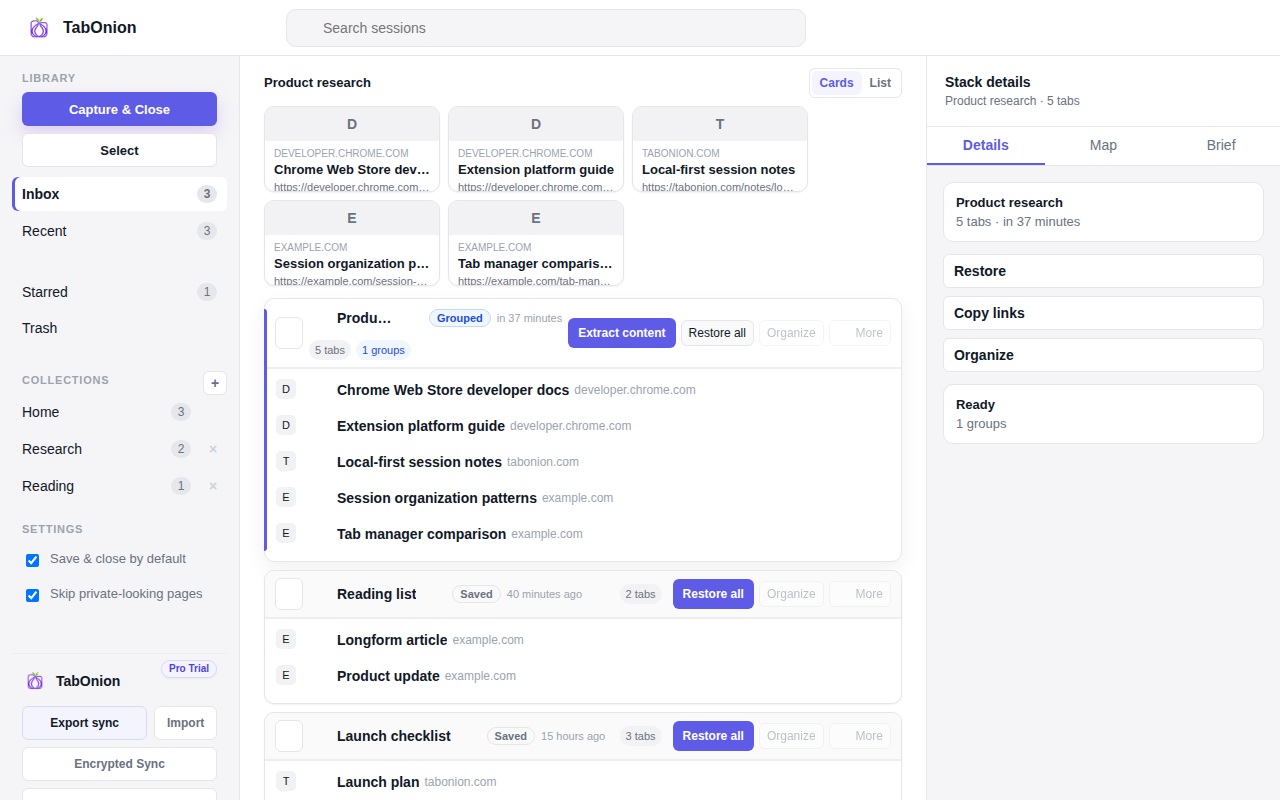
Choose the tabs that belong to the task instead of saving a browser-shaped mess.
Delete noisy links, check the source list, and keep the stack readable before handoff.
Export Markdown or restore the browser session later without sending cookies or login state.
30-second flow
Open 22 research tabs. Select the 14 that matter. Capture and close them. Remove the 3 noisy pages. Export Markdown into ChatGPT, Claude, or Obsidian. Restore the same source stack later when the work comes back.
Private by default
TabOnion does not export cookies, passwords, form inputs, session tokens, page bodies, or saved Markdown through the normal capture flow. Website analytics measure page usage, not your saved tab lists.
Guides
Save selected tabs into a local stack before closing the browser window.
Turn browser source lists into Markdown for docs, notes, and AI prompts.
Find workflows for tab overload, research sessions, browser memory, and AI-ready source lists.
Start with the Chrome Store version that keeps New Tab untouched, then add the optional New Tab edition only if you want TabOnion as your start page.